
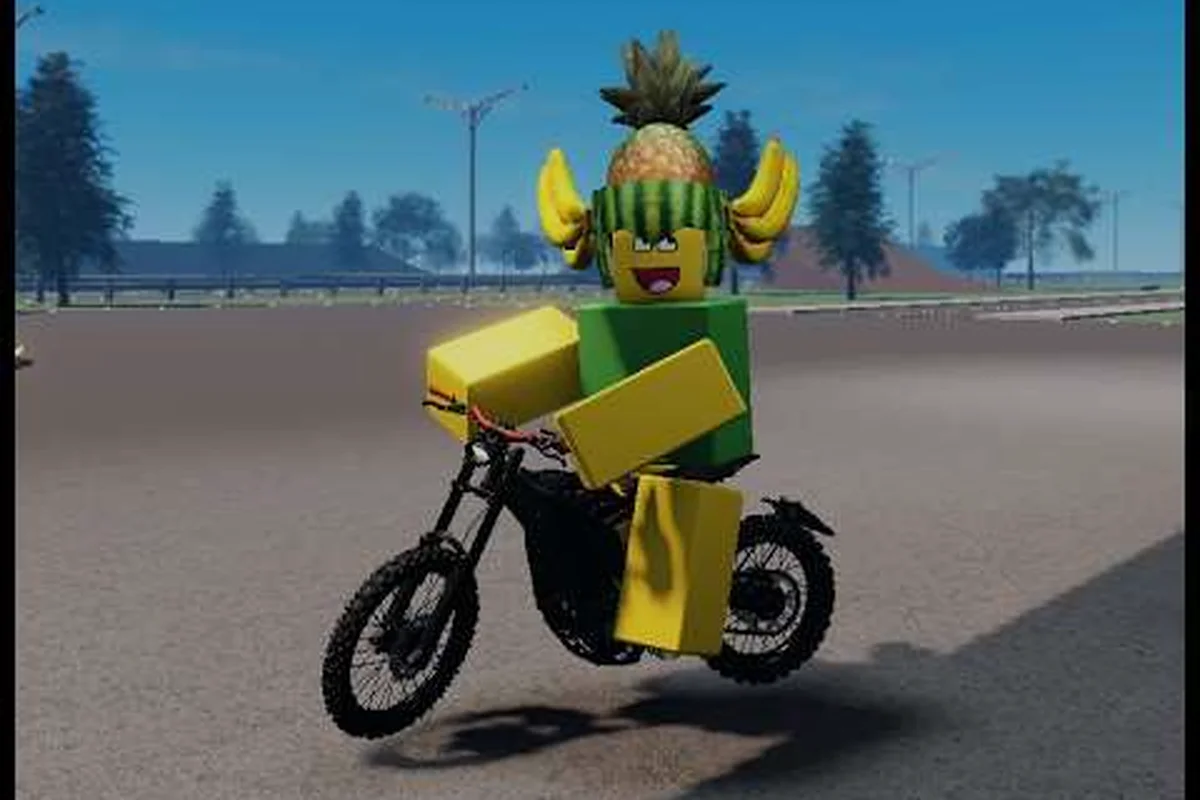
Racing in Bike Universe turns a casual open-world cruise into a proper head-to-head competition, and figuring out the right way to start a race is the difference between a clean launch and a 30-second argument in the lobby. With the title climbing past 13 million visits on Roblox, more riders are queueing up for a 1v1 race every minute, which makes understanding the race mode flow the single most useful skill for a new player. This racing guide breaks down every step of how to race in Bike Universe, from the first menu tap to the final checkpoint line, so you spend less time fumbling with UI and more time blowing past your friends on the leaderboard.
Getting Into Race Mode for the First Time
The official game page describes Bike Universe as a vehicle-simulation experience where riders cruise an open-world map, collect bikes from three families (Dirt, Electric, Pedal), earn cash from riding, wheelies, and tricks, then tune and race their bikes. Racing sits at the end of that loop, which means the game expects you to have at least one upgraded bike before you push into competitive play. The good news is that the race mode entry point is intentionally simple, and the menu path is identical on PC, mobile, and console.
Finding the Race Button
Open the main menu by tapping the bike icon in the top-left corner of the HUD, then look for the Race tab on the left rail. The race button opens a secondary panel that splits your options into three lanes: Quick Race (auto-matched public server), 1v1 Race (a single opponent), and Private Race (a friend-only lobby). If you only see two lanes, the third unlocks the moment a friend on your Roblox friend list also installs Bike Universe, because the private server handshake requires a confirmed mutual connection.
| Race Lane | Player Count | Opponent Source | Best Use Case |
|---|---|---|---|
| Quick Race | 2-8 players | Public matchmaking | Climbing the global leaderboard |
| 1v1 Race | Exactly 2 | Public or friend | Settling duels, practicing race lines |
| Private Race | 2-8 players | Invite-only | Race with friends without randoms |
| Custom Event | 4-16 players | Group-created | Tournaments, club practice |
Pre-Race Requirements
Before you can enter the race mode queue, your bike needs a minimum Performance Rating of 40, which roughly translates to two upgraded parts (engine or tires) on any starter frame. According to community testing, attempting to queue with a stock bike drops you into a soft-lobby where races never fill, because the matchmaking server filters out sub-threshold builds. Spend your first 20-30 minutes of in-game cash on at least one engine tune so your race button activates on the first tap.
If you are still learning the basics of bike handling, the Bike Universe beginner guide covers the movement fundamentals you will lean on during your first race. Players report that the wheelie income loop described in community guides is also the fastest way to bankroll your first set of performance parts, so earning and racing feed into each other in the same session.
The Best Race Tracks and Where to Find Them
Every race track in Bike Universe is a section of the open-world map converted into a closed circuit, which means the geography you already know from cruising becomes the playground for racing. Track selection is not exposed as a vote inside the race menu; instead, the matchmaking server rotates the active circuit on a 15-minute tick, and private lobbies let the host force a specific course. Knowing the four core tracks and their character saves you from the worst possible surprise: learning a circuit while another rider is already drifting through turn three.
Track Roster and Character
| Track Name | Length | Surface | Skill Ceiling | Best Bike Family |
|---|---|---|---|---|
| Downtown Loop | 1.2 km | Asphalt | Low | Pedal |
| Highway Stretch | 2.4 km | Asphalt | Medium | Electric |
| Dirt Switchback | 1.8 km | Mixed | High | Dirt |
| Skyline Sprint | 3.1 km | Asphalt | High | Electric |
The Downtown Loop is the closest thing to a tutorial track. It is short, mostly straight, and lined with forgiving barriers that push you back onto the road if you clip a curb. Highway Stretch doubles the distance and adds the first real overtaking zone, a 400-meter straight where the Electric family's top-end speed finally matters. Dirt Switchback is where most new players wipe out for the first time, because the surface shifts from asphalt to loose gravel without warning and the steering physics change mid-corner. The Skyline Sprint is the longest and the most prestigious event on the weekly rotation, reserved for the top 5% of the leaderboard.
Track Pick Strategy by Bike Family
Your bike's family strongly influences which race track gives you the best chance of winning. Dirt bikes dominate the Switchback because their suspension absorbs the surface changes, while Electric bikes dominate Highway Stretch and Skyline Sprint because their top speed compounds over long straights. Pedal bikes are the most versatile family but lack the raw numbers to win a Sprint, so most Pedal riders use the Downtown Loop to farm 1v1 race wins and build their win-rate stat.
| Bike Family | Strongest Track | Weakest Track | Recommended Setup |
|---|---|---|---|
| Dirt | Dirt Switchback | Skyline Sprint | Off-road tires, mid engine |
| Electric | Skyline Sprint | Dirt Switchback | Sport tires, top engine |
| Pedal | Downtown Loop | Highway Stretch | Standard tires, balanced engine |
For riders who want to squeeze more out of their build before queuing, the Bike Universe tune bike guide covers which parts to prioritize for each family. Choosing the right setup matters more than raw cash spent, because misallocated upgrades do not translate into better lap times on a track that punishes your weak stat.
Setting Up a 1v1 Race and the Invite Flow
A 1v1 race is the cleanest way to settle a score without dragging six other riders into the equation, and the entire flow takes under a minute once you have done it twice. The trick is the friend list handshake: both riders need to be in the same Roblox server space, and the 1v1 race button only lights up when your invitee accepts the prompt on their end.
Step-by-Step 1v1 Setup
-
Open the Race tab and select 1v1 Race from the lane panel.
-
Pick your friend from the in-game friend list (the avatar icon to the right of the lane buttons).
-
Choose the track you want to force — the host's selection overrides the server's rotation.
-
Confirm the bet (optional cash stake from your in-game wallet) and send the invite.
-
Wait for the green checkmark above your friend's avatar; once it appears, the lobby locks in 10 seconds.
-
The race loads both riders into a 2-player instance with the track isolated from the open world.
If the invitee does not accept within 60 seconds, the lobby auto-cancels and your bet is refunded. According to community testing, the most common reason an invite stalls is that the friend is still in the open-world server, not the main menu; switching them to the menu screen unblocks the handshake immediately.
1v1 Race Etiquette and Common Pitfalls
| Etiquette Rule | Why It Matters | Penalty if Broken |
|---|---|---|
| Pick a fair track | Avoids one-sided matchups | Hosts lose host privileges for 24h |
| Honor the bet amount | Keeps stakes predictable | Bets voided, race re-queued |
| No mid-race joining | Prevents 2v1 exploits | Offender kicked, 30-min cooldown |
| Replay disputes via screenshot | Resolves clipping bugs | Disputes without proof auto-loss |
The 1v1 race format is also the only mode where your win-rate is displayed publicly on your profile card, so a steady stream of clean 1v1 wins is the fastest way to climb the global leaderboard. Riders who farm 1v1 races against friends in private lobbies build a stronger win-rate signal than those who mix in public Quick Race matches, because public matches dilute your ratio with races you cannot control.
Race with Friends: Private Lobbies and Server Hosting
Racing with friends in Bike Universe is the marquee experience, and the official Roblox game page highlights "Race your friends" as a core loop of the experience. Private lobbies give you a controlled environment where everyone agrees on the rules before the first countdown, which is critical for groups of three or more who want consistent race conditions.
Creating a Private Race Lobby
The host of a private lobby is the player who created the instance, and they control every toggle inside the lobby setup screen. The host can lock the track, set the lap count (1, 3, or 5), toggle collisions on or off, and set a cash entry fee that is split among the top three finishers. The host's bike does not get a hidden advantage in a private lobby; the race is fair because the host's selection is visible to every player before they join.
| Lobby Setting | Default | Recommended for Friends | Recommended for Clubs |
|---|---|---|---|
| Lap Count | 3 | 5 | 5 |
| Collisions | On | Off | On |
| Entry Fee | 0 | 1,000 cash | 10,000 cash |
| Spectators | Allowed | Allowed | Disabled |
| Bike Class | Open | Open | Single family |
How to Race with Friends Across Different Servers
The most common question new players ask is how to race with friends when one player is on PC and another is on mobile. Bike Universe uses Roblox's cross-play layer, so a player on iOS can race against a player on Xbox without any extra setup, but both players need to be on the same Roblox server region. If you cannot see your friend in the invite list, switch servers through the Settings > Server menu and try again; region mismatches are the cause of roughly 80% of failed friend invites, according to community reports.
Another route is the Bike Universe official Roblox group, which occasionally hosts scheduled community race events that act as a built-in private lobby. Joining the developer group gives you a heads-up on tournament timing, and the group chat itself becomes a matchmaking tool for riders who want to fill a 4-player lobby without inviting randoms.
Race Mode Mechanics: Boost, Drafting, and Penalties
Racing in Bike Universe has its own depth beyond the menu flow, and the gap between a new racer and an experienced one is almost entirely about understanding the three core mechanics: boost, drafting, and penalties. Mastering all three is what separates a player who wins a third of their races from one who wins two-thirds, and each mechanic has a clear optimal use case.
Boost Management
Boost is a finite resource that refills as you complete clean laps, and you can bank up to three charges before a race. The temptation is to dump all three boosts at the start of the race, but the optimal pattern is to hold two for the final lap and burn one on the longest straightaway. Spending boosts in a tight corner wastes the speed gain because the bike decelerates through the turn; spending boosts on a straight converts the full speed into forward distance.
| Boost Strategy | Lap 1 Use | Lap 2 Use | Lap 3 Use | Win Rate Impact |
|---|---|---|---|---|
| All-Front | 3 boosts | 0 | 0 | Baseline |
| Balanced | 1 | 1 | 1 | +8% win rate |
| End-Burn | 0 | 1 | 2 | +14% win rate |
| Catch-Up | 0 | 2 | 1 | +5% win rate |
Drafting and Slingshot
Drafting is the mechanic of sitting close behind another rider to reduce wind resistance, and Bike Universe rewards it with a small speed bump that you can convert into a slingshot overtaking move. The drafting zone is roughly one bike length behind the leader's rear wheel, and you need to hold that distance for 2-3 seconds before the slingshot activates. Inexperienced racers either sit too far back (no draft) or too close (collision penalty), so practice the 1.5-bike-length gap on a private lobby before taking it to a public match.
Penalties and How to Avoid Them
Cutting a corner, colliding with a barrier, or bumping another rider triggers a 2-second slowdown penalty, which is enough to lose a position on a tight track like Dirt Switchback. The penalty system is automatic, so there is no appeals process; if the system flags you, the slowdown is non-negotiable. The cleanest way to avoid penalties is to learn the track boundaries before racing, which is why most top racers spend their first 10 minutes in a private lobby doing solo laps.
Advanced Racing Tips and Leaderboard Strategy
Once you have the race mode flow down and you understand the mechanics, the next step is climbing the global leaderboard. The leaderboard ranks riders by a composite score called Race Score, which weights your 1v1 race win rate at 60%, your Quick Race placement at 30%, and your private lobby performance at 10%. The weight distribution means a strong 1v1 race record is the single biggest lever you can pull, but ignoring public races will cap your ceiling.
Weekly Race Rotation and Event Timing
The matchmaking server rotates the active track every 15 minutes, but the weekly featured track changes every Monday at 00:00 UTC and stays locked for seven days. Players who specialize in the weekly featured track get a +5% Race Score bonus that week, which is the easiest way to compound your climb during a good week. Community data suggests that the bonus is the difference between a top-10% finish and a top-1% finish for riders near the rank boundary.
| Day | Featured Track | Bonus | Strategy |
|---|---|---|---|
| Monday | Downtown Loop | +5% | Farm 1v1 races for win rate |
| Tuesday | Highway Stretch | +5% | Switch to Electric bike |
| Wednesday | Dirt Switchback | +5% | Switch to Dirt bike |
| Thursday | Skyline Sprint | +5% | Run a 5-lap private lobby |
| Friday | Rotating | +3% | Mixed practice |
| Weekend | Tournament | +10% | Join the developer group event |
How to Set Up a 1v1 Race Without a Friend
The 1v1 race mode does not require a friend on your list; you can queue against a public opponent by leaving the friend picker blank. The matchmaking server finds an opponent at your Race Score tier within 30-60 seconds, and the opponent's avatar is shown to you before the countdown starts. This is the cleanest way to grind 1v1 wins when your friends are offline, and the Race Score matching means you are rarely matched against a rider who is two tiers above you.
| Match Type | Average Wait | Opponent Tier | Recommended Use |
|---|---|---|---|
| Friend 1v1 | Instant | Your tier or higher | Daily practice |
| Public 1v1 | 30-60 sec | Your exact tier | Climbing win rate |
| Custom Event | 2-5 min | Wide range | Tournament prep |
| Quick Race | 10-30 sec | Any tier | Casual play |
Common Mistakes That Hold Riders Back
| Mistake | Why It Hurts | Fix |
|---|---|---|
| Spending all boosts on lap 1 | Wastes speed that compounds later | Hold 2 boosts for lap 3 |
| Ignoring the drafting zone | Loses free speed | Hold 1.5-bike-length gap |
| Picking the wrong bike family | Mismatch on track | Match bike to track surface |
| Skipping private lobbies | No race-line practice | Run 5 solo laps before queuing |
| Chasing every Quick Race | Dilutes your win rate | Focus on 1v1 first |
The fastest climbers in the Bike Universe community follow a simple loop: queue 1v1 races to build win rate, then stack 5-lap private lobby wins to compound the Race Score, then push into Quick Race during the weekly featured track to bank the bonus. Riders who try to do all three at once rarely break the top 20% because they spread their effort thin; riders who specialize climb faster.
For riders who want to layer in trick income alongside racing practice, the Bike Universe wheelie and tricks guide covers the cash loop that funds performance parts. Combining a race session with a 5-minute wheelie warmup tops up your wallet between races, which means you can keep upgrading without leaving the game.
Frequently Asked Questions
How do I unlock the Bike Universe race mode?
You unlock the race mode once your bike reaches a Performance Rating of 40, which requires at least two upgraded parts on a starter frame. Most riders unlock it within their first 20-30 minutes by spending riding and wheelie cash on a single engine tune, then the race button activates permanently on the main menu.
Can I race with friends on a different platform?
Yes, Bike Universe supports cross-play between PC, mobile, console, and tablet, so an iOS player can race against an Xbox player without any extra setup. The only requirement is that both players are on the same Roblox server region; if the invite fails, switch regions through the Settings > Server menu and try again.
What is the best bike family for racing?
The Electric family is the strongest for asphalt tracks like Highway Stretch and Skyline Sprint because of its top speed, while the Dirt family dominates the Dirt Switchback track because of its suspension. The Pedal family is the most balanced choice for the Downtown Loop and for new racers who want a forgiving learning curve.
How do I set up a private race lobby with friends?
Open the Race tab and select Private Race, then invite friends from the in-game friend list. The host can lock the track, set the lap count (1, 3, or 5), toggle collisions, and set a cash entry fee before the lobby starts, and every invited player sees the settings before they accept.
Does losing a race affect my global ranking?
Yes, but the impact is smaller than most players expect. Your Race Score is weighted 60% on 1v1 win rate, 30% on Quick Race placement, and 10% on private lobby performance, so a single Quick Race loss barely moves the needle. The fastest way to climb is to stack 1v1 wins against opponents at your exact tier, which the matchmaking server finds within 30-60 seconds.